Costing & Margins

Know What
Every Dish
Earns.

Keep ingredient prices in one list, link them to your menu, and see the cost, margin and profit of every dish. When a supplier price moves, you see which dishes it hit.

No credit card required. No contracts. Cancel anytime.
No Per-Cover Fees
Flat pricing, even on your busiest nights
Free Forever Plan
All features, no card needed
Family-Run Support
Real people, not a call centre
What You Get

From Supplier Invoice To Menu Price

The costing spreadsheet most kitchens mean to keep up to date, kept up to date by the system your menu already lives in.

One Ingredient List

Every ingredient with its pack size, pack price, supplier, allergens and usable yield. Change a price once and each dish that uses it is re-costed.

Dish Costs

Add ingredients and quantities to a dish and its cost is worked out as you go, down to the 40g of butter.

Margins Against A Target

Set a target margin and every dish shows where it stands. If one is under, it shows the price that would put it right.

Supplier Invoices

Upload an invoice, credit note or price list as a PDF, a photo or a CSV. Each line is read and matched to your ingredients for you to check.

Menu Engineering

Sales and margin together sort the menu into stars, workhorses, puzzles and dogs, so you know what to push, reprice or drop.

Alerts

Set up an email for when a dish drops below its target margin, or when an ingredient's unit cost goes up.
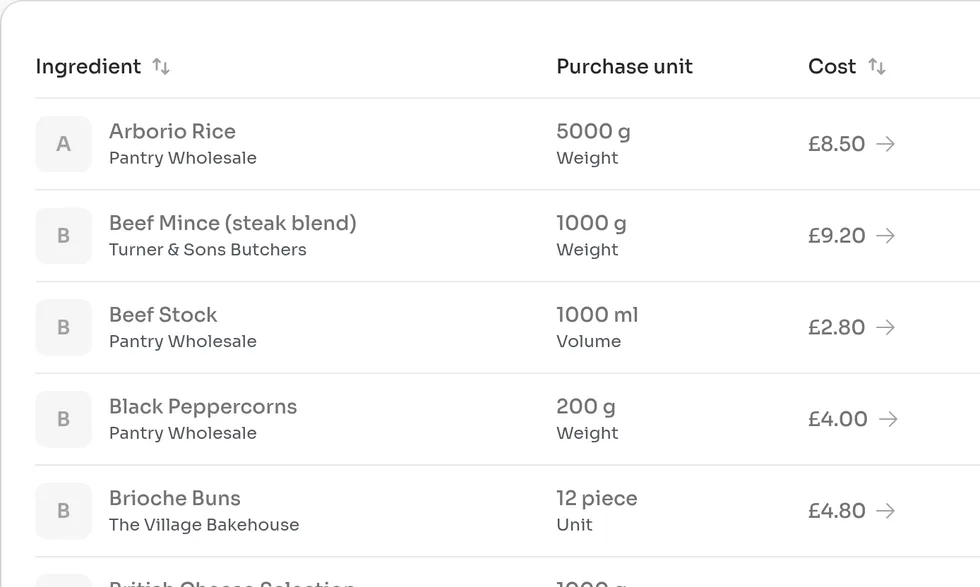
The Ingredients page listing each ingredient with its supplier, purchase unit and pack cost
Ingredients

One Price List.
Every Dish.

Butter is in the parfait, the brownie, the ciabatta and the sticky toffee pudding. In a spreadsheet that is four cells to remember. Here it is one price, and each ingredient shows the dishes that use it.
What you buy, as you buy it
Record the pack, the price and the supplier. Ingredients can be bought by weight, by volume or by the piece.
Usable yield
Tell it a kilo of onions gives you 850g once peeled and the cost per usable gram adjusts.
Prep items
Cost a batch of toffee sauce from its own ingredients, then use it in dishes like anything else on the list.
Allergens carried through
Allergens recorded on an ingredient are suggested for every dish that uses it. Nothing is added to a dish until you confirm it.
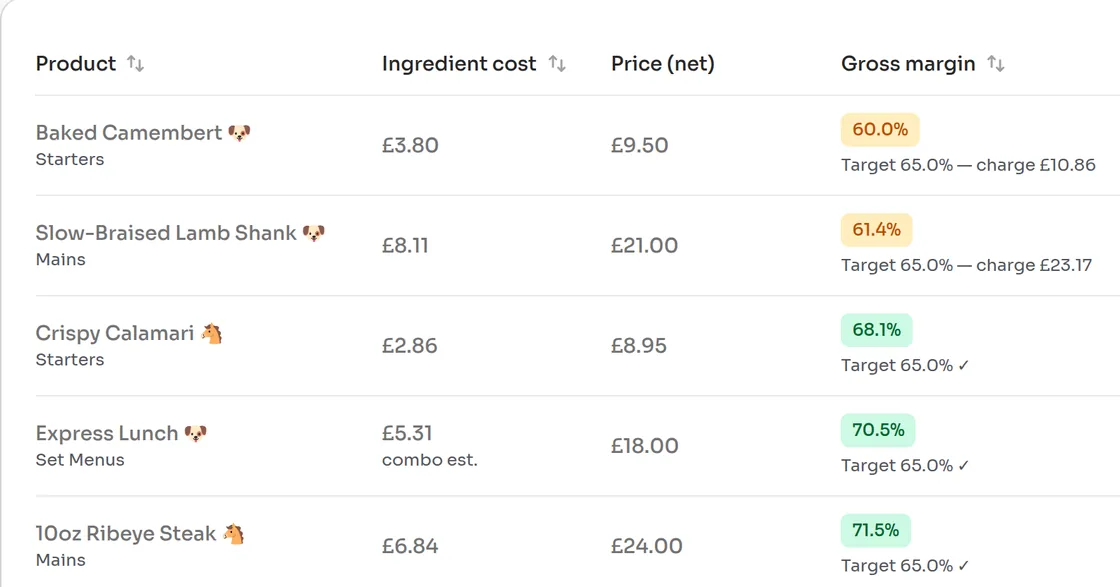
Margins table showing Baked Camembert at 60% gross margin against a 65% target with the price to charge, next to dishes that are on target
Margins

The Price To Charge,
Worked Out.

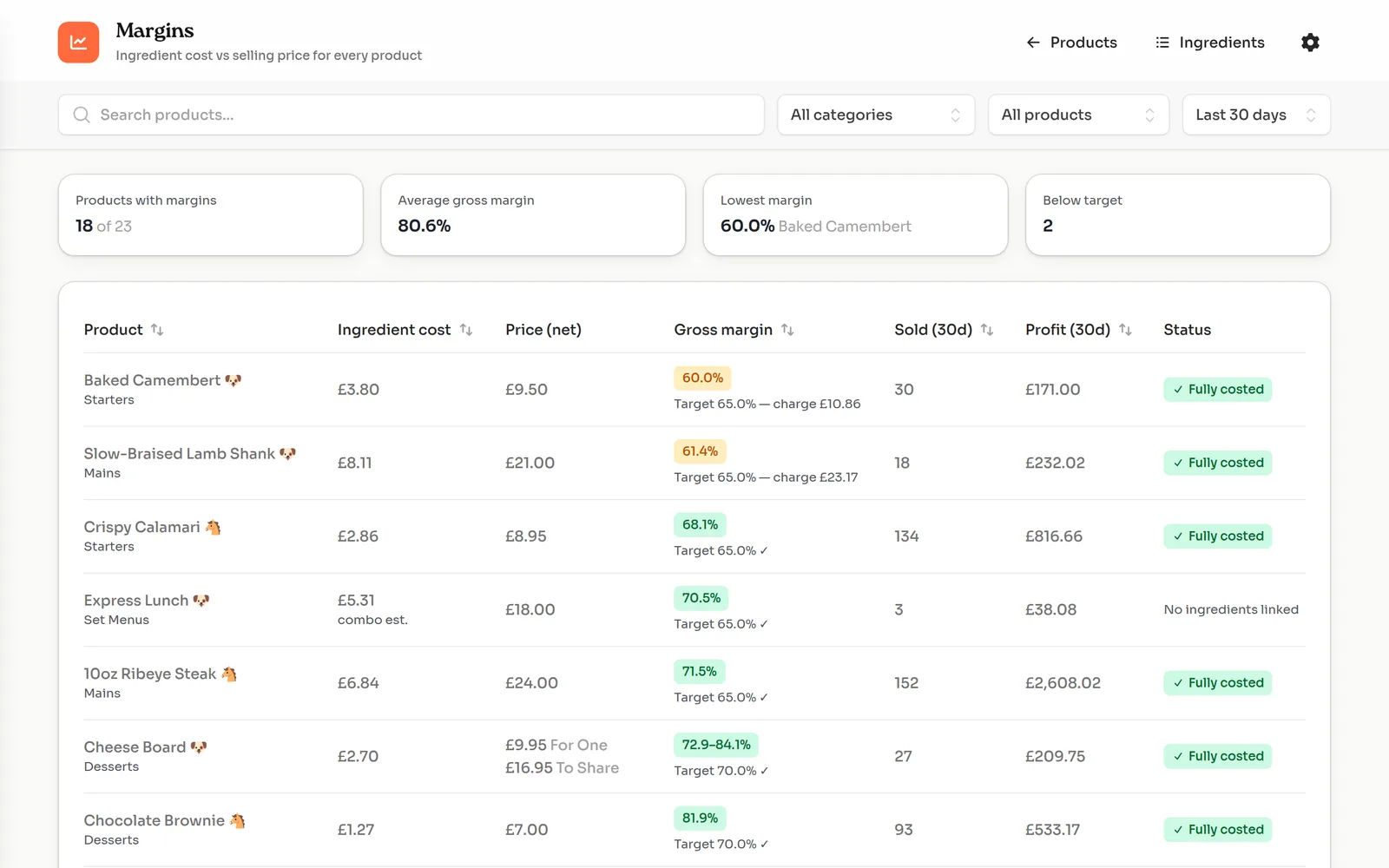
The baked camembert costs £3.80 to plate and sells for £9.50 before VAT. That is a 60% margin against a 65% target, and the page says what to do about it: charge £10.86.
Your own target
Set the margin you want to make. Every dish is marked as on target or under it.
The price to charge
A dish under target shows the menu price that would bring it back, so the fix is one number.
Sold and earned
Units sold and profit for the last 7, 30 or 90 days, from sales through the till, table ordering and pre-orders.
Stars, workhorses, puzzles, dogs
Filter to the dishes that sell and earn, the ones that sell but earn little, and the ones doing neither.
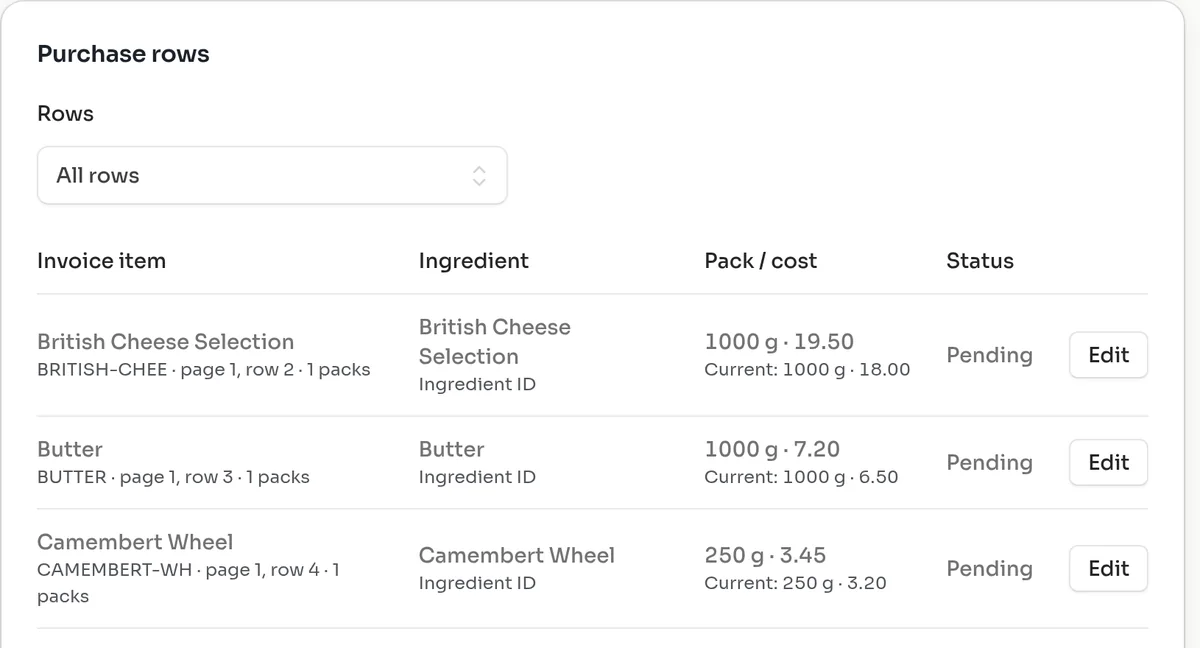
Reviewing an uploaded supplier price list: each line matched to an ingredient, with the new pack price shown against the current one
Supplier Invoices

Photograph The Invoice.
Check The Lines.

Costings go stale because nobody has time to retype the dairy invoice. Upload it instead. You see the new pack price next to the old one for every line, and nothing changes until you have looked at it.
PDF, photo or CSV
Invoices, credit notes and price lists. Upload one and carry on: it is read in the background and waits for you to review.
Lines matched for you
Each line is matched to an ingredient by supplier code or name. Correct a match once and it is remembered for that supplier.
You choose the cost
A new price sits beside your current one. You decide which supplier's price each ingredient is costed from.
Spend by supplier
Confirmed invoices and credits build a spend report by supplier, with a comparison of pack prices and CSV export.
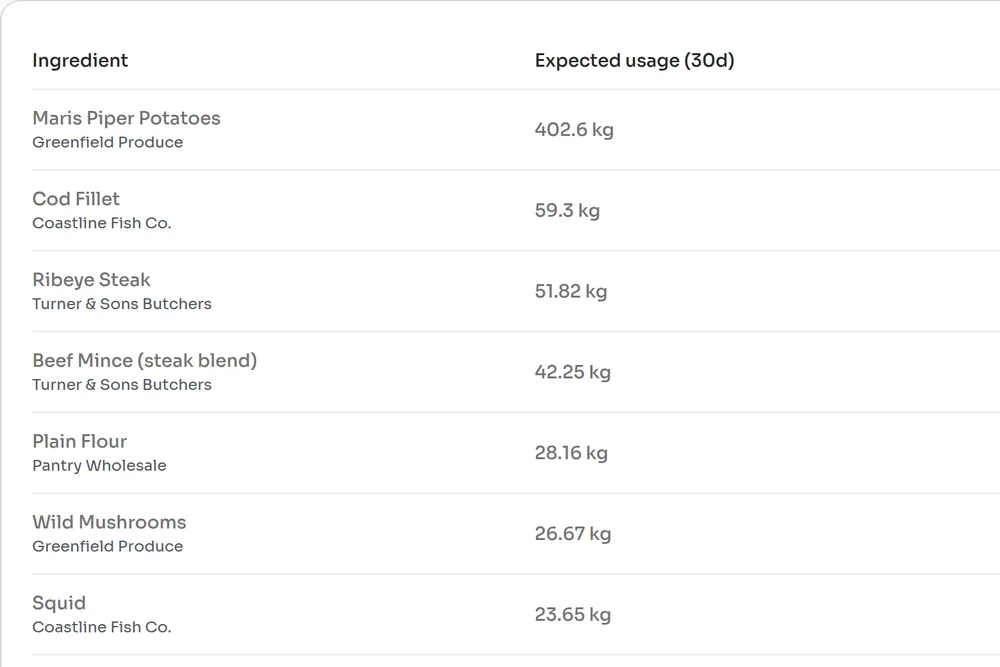
Ingredient usage report listing expected usage over 30 days for potatoes, cod, ribeye and other ingredients, in kilos and in packs
Usage

What Your Sales
Should Have Used.

If the till says you sold 223 burgers, the mince should have gone down by about 42 kilos. When it has gone down by 50, you know where to look.

Worked back from sales
Every dish sold is multiplied through its ingredients to give expected usage for the last 7, 30 or 90 days.
In packs as well as kilos
Usage is shown as the packs you buy, so it reads like an order.
Batches broken down
Prep items are expanded into their own ingredients, so the butter in the toffee sauce is counted.
Check it against the shelf
Compare expected usage with your own stock count to spot heavy portions and waste.
And More

The Rest Of The Kit

The smaller things that keep a costed menu honest.

Ingredients

Import and export your ingredient list as a CSV
Search by name, SKU or supplier
Price history on every ingredient

Margins

Combos and set menus costed from the dishes inside them
Margins across every size or price option of a dish
Filters for dishes below target and dishes not yet costed

Purchasing

Credit notes reduce spend without touching your costs
A cost impact report after supplier prices change
An alert when a supplier price has not been updated for a while
FAQ

Costing Questions, Answered

How does BookingNinja work out what a dish costs?
You keep a list of ingredients with the pack you buy and what you pay for it. On each dish you add the ingredients it uses and how much. BookingNinja works out the cost of each quantity from the pack price, allows for the usable yield, and adds them up. Change a pack price and every dish that uses it is re-costed.
Do I need to use the BookingNinja till to see my margins?
No. Ingredient cost, margin and the price to charge only need your ingredients, your dishes and your menu prices. The units sold, profit and menu engineering figures do need sales, and those come from orders taken through the BookingNinja till, table ordering and pre-orders.
Can it read my supplier invoices?
Yes. Upload an invoice, credit note or price list as a PDF or a photo (up to 10 MB), or a price list as a CSV. The document is read automatically and each line is matched to an ingredient. You review the matches and the figures before anything is applied.
Will an uploaded invoice change my menu costs without asking?
No. A newly read price is kept as an offer next to your current cost. An ingredient carries on using the cost you set, or the supplier price you chose as its source, until you pick a different one.
What do stars, workhorses, puzzles and dogs mean?
It is the usual menu engineering split. Stars sell well and earn a good margin. Workhorses sell well but earn little. Puzzles earn a good margin but sell slowly. Dogs do neither. BookingNinja sorts your dishes into the four groups from your own sales and margins.
Is this a stock control system?
Not a full one. BookingNinja shows the ingredient usage your sales should have produced, and dishes can carry a stock count that marks them sold out at zero. It does not run stocktakes or post to accounting software.
Is costing an extra module to pay for?
No. Ingredient costing, margins, supplier invoice uploads and the purchasing reports are included on every BookingNinja plan, including the Free Forever plan.
Can I try the sums before signing up?
Yes. The free food cost calculator on this site costs one dish from its ingredients and gives the menu price for your target, with VAT handled. It needs no account.
Explore More

More Ways to Run Your Venue

Every BookingNinja plan bundles these tools in. Take a look at what else you get.

WebsiteNinja

A full website builder with free design and setup.

Learn more

Memberships

Recurring subscriptions, member perks, and automated billing.

Learn more

Member Events

Let members host and fill their own events at your venue.

Learn more

Pre-orders

Guests choose food and drink before they arrive.

Learn more

Order at Table

Scan-to-order from the table, straight to your kitchen.

Learn more

Online Ordering

Delivery and collection orders from your own website.

Learn more

Point of Sale

A full till, kitchen display and cash-up, at no extra cost.

Learn more

Staff Rota

Build rotas, manage shifts, and share schedules with staff.

Learn more

Floor Plans

Draw your room, run service live, and let guests pick their table.

Learn more

Waivers

Waivers sent with every booking, signed per guest, chased automatically.

Learn more

Gift Vouchers

Sell branded vouchers online, let groups chip in to one card, and manage every balance.

Learn more

Analytics

Revenue, demand, attribution and forecasts. Zero spreadsheets.

Learn more

Venue Benchmarks

Free anonymous booking benchmarks across UK venues, refreshed nightly.

Learn more

Deposits & No-Shows

Deposits, prepayment or card capture, and charges for no-shows.

Learn more

Social Graphics

Design posts and posters that auto-fill with your events.

Learn more

Soft Play

Age-band pricing, school-holiday sessions, and party payments.

Learn more

Free for Charities

Registered charities get the Gold plan free. Discounts for CICs.

Learn more

Quandoo Alternative

Quandoo is closing. Switch to direct bookings with hands-on migration.

Learn more

See every feature

Browse the full BookingNinja feature list in one place.

All features

Ready to Cost
Your Menu?

Add your ingredients, link your dishes and see your margins this afternoon. No credit card, no contracts.

Free Forever plan: 50 no-payment bookings a month. Upgrade anytime.